
A wedding seating planner

A seating plan, without the spreadsheet.

Drag your guests into seats, share with whoever you need to, hand the venue a clean PDF.

We seated 146 of our own guests in half an hour. Free up to twenty; ten pounds when you’re ready to print.

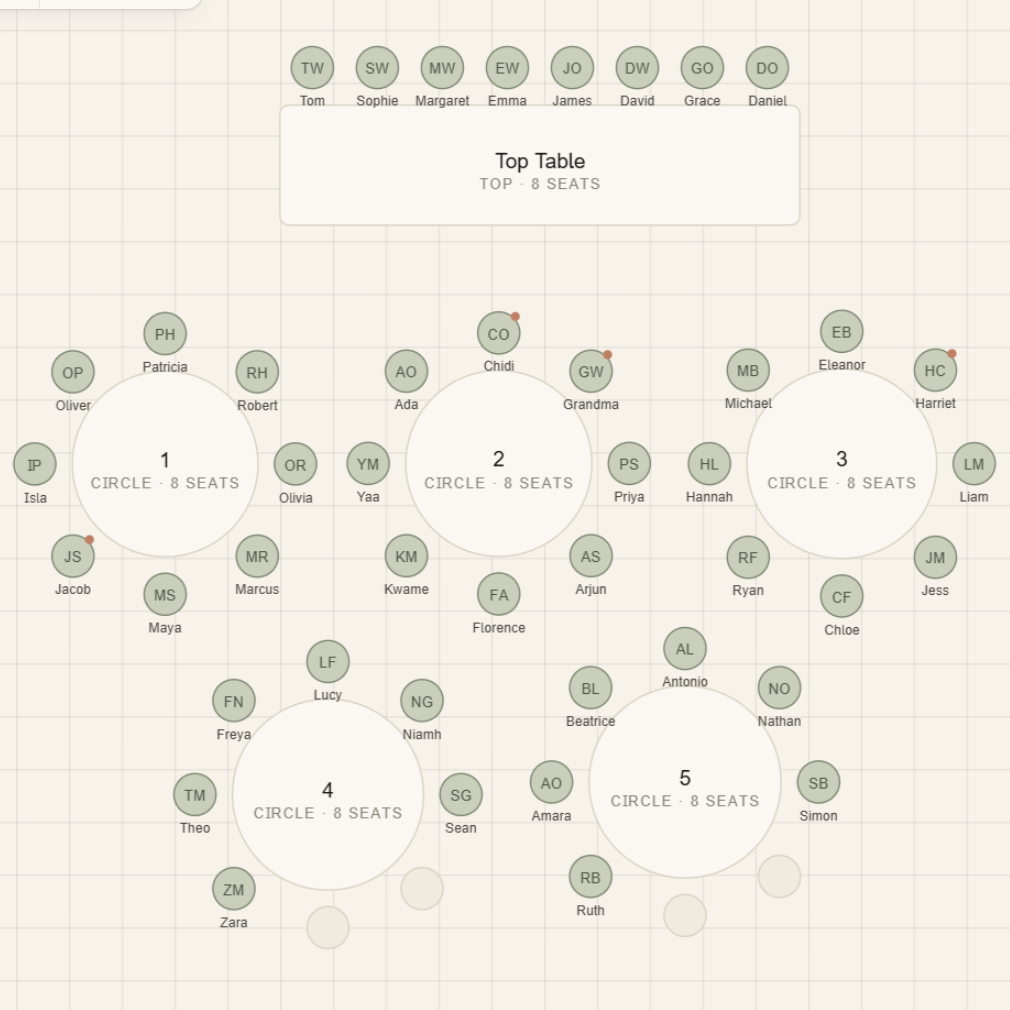
A tableplan canvas: a top table with eight seats, and five round tables of eight, each chair labelled with a guest's name.
Will and Jasmine on their wedding day, hand in hand and laughing, both wearing floral garlands.
Will & Jasmine, Manchester.

Why this exists

We built it because we needed it.

In the final weeks before our wedding, Jasmine and I needed to seat 146 guests. We’d built the wedding website on Withjoy and assumed it’d handle the seating plan too. It doesn’t.

The free tools we tried were rough. The paid ones didn’t seem any better. None of them imported our guest list cleanly. None of them produced a printable layout the venue could actually use on the day — least of all one that flagged, table by table, who was vegetarian and who was gluten-free.

So I built tableplan. We imported our guest list and had a finished PDF half an hour later. The venue had what it needed; we got our evening back.

— Will & Jasmine, Manchester
Why tableplan

Made for the bit weddings hate the most.

The seating plan is the one task that everyone puts off and nobody enjoys. tableplan is built specifically for that — and only that.

  • 01

    Drag, don’t spreadsheet.

    A canvas with real tables and real chairs. Move a guest from one table to another in a second, not a series of cell edits.

  • 02

    Share with partner, parents, or planner.

    Unlimited free collaborators on every event. Everyone sees the same plan; nobody emails a v3-FINAL-final.xlsx.

  • 03

    Print-ready PDF, venue-ready.

    Export a clean PDF the venue can hand to staff on the day. Plus a CSV and an alphabetised guest-to-table list.

  • 04

    Pay once, when you’re ready.

    Free up to 20 guests. £10 per event when you’re ready to print. No subscription, no tiers, no upsell.

How it works

Three steps. About a Sunday afternoon.

  1. Step 1

    Build your tables.

    Add a top table, round tables, long tables — match your venue. Drag them around the canvas until the layout feels right.

  2. Step 2

    Place your guests.

    Drop in a CSV from Withjoy, The Knot, Zola, Joy, Hitched, Bridebook, or your own spreadsheet. Drag each name into a chair. Dietary notes ride along with the guest.

  3. Step 3

    Share and print.

    Invite your partner and planner to review. When you’re ready, pay £10 and export the PDF the venue needs.

What you get

A PDF the venue knows what to do with.

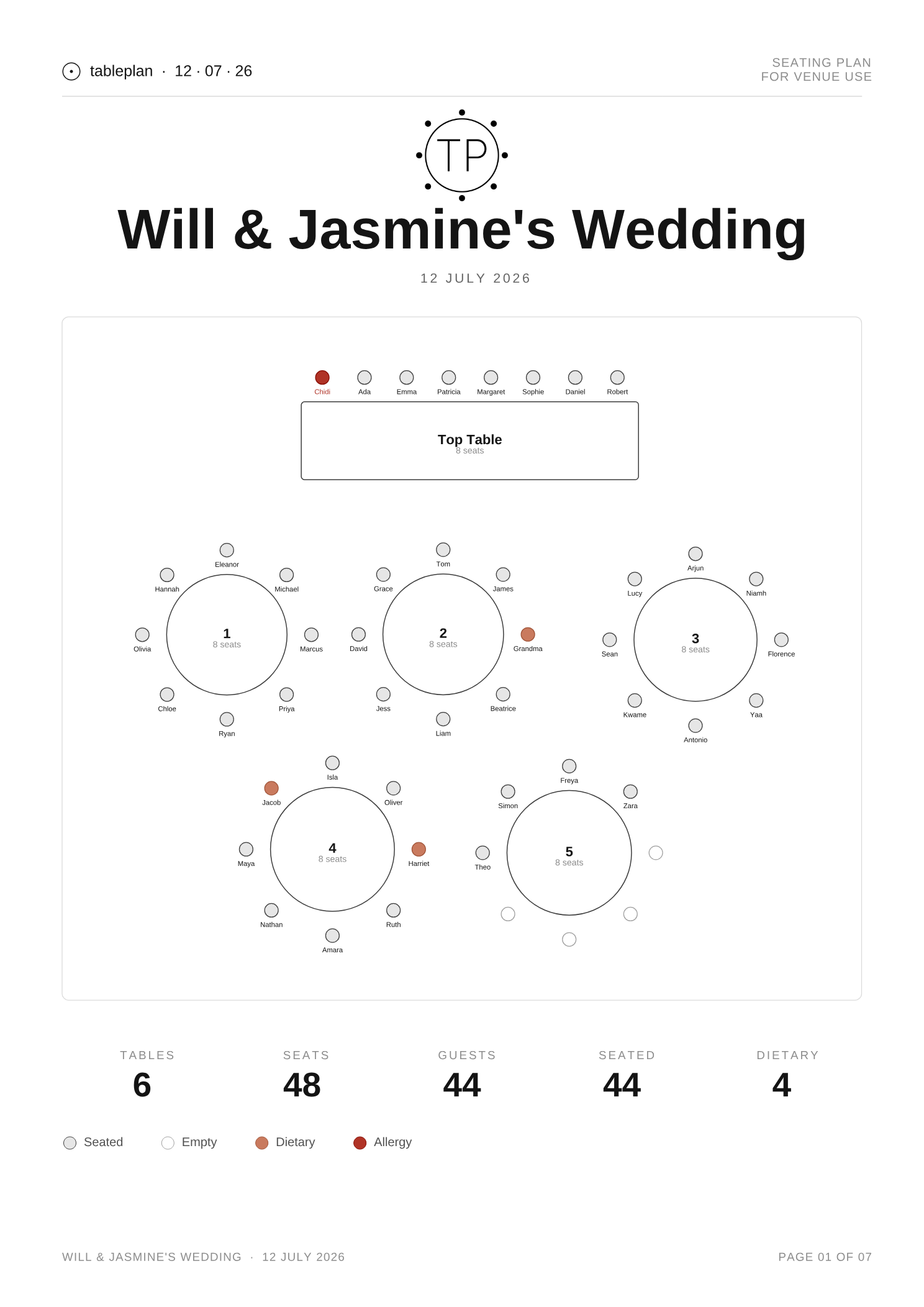
One page per table, or one page for the whole plan — your choice. Names large enough to read across a room. Dietary marks beside every guest who needs one, so the kitchen and front-of-house can’t miss them.

Page one of an exported seating-plan PDF: a top table and five round tables of eight, each chair labelled with a guest's name, dietary and allergy seats marked, and a summary row showing 6 tables, 48 seats, 44 guests seated and 4 dietary notes.
The whole-plan overview page. The full export adds a detail page per table; sample names throughout.

Pricing

Free to plan. Ten pounds to print.

One price. One event. No subscription, no add-ons, no premium tier unlocking the bit you actually need.

£10 per event

Free up to 20 guests · pay only when you’re ready to export.

  • Unlimited guests
  • Unlimited collaborators
  • PDF and CSV export
  • Alphabetised guest-to-table list
  • Dietary requirements on the guest record
  • 14-day refund, no questions
Start free

No card needed to start. Pay when you export.

Frequently asked questions

Questions we’ve actually been asked.

  • Who built this, and why?

    Will and Jasmine, a couple in Manchester, after we couldn’t find a good way to seat the 146 guests at our own wedding. The free tools were rough, the paid ones didn’t seem any better, and none of them imported cleanly from Withjoy or printed something we’d want to hand a venue. So we built it.

  • Is this a subscription?

    No. tableplan is a one-off £10 per event, paid when you’re ready to print. There are no tiers, no recurring charges, and no upsell.

  • Can I invite my partner, parents, or planner?

    Yes. Every event has free, unlimited collaborators. Invite anyone you need by email and edit together.

  • What if my wedding is cancelled or postponed?

    Your event stays in your account. You only pay the £10 when you’re ready to export, whenever that turns out to be.

  • Can I import my guest list from Withjoy, The Knot, Zola, or Joy?

    Yes. Export your guest list as a CSV from Withjoy, The Knot, Zola, Joy, Hitched, Bridebook, RSVPify, or any other planning tool and drop it in. Keeping your list in Google Sheets, Excel, or Numbers? Save as CSV and import that.

  • Do you handle RSVPs?

    No. tableplan does the seating plan and that’s it. Use any RSVP tool you like and import the guest list as a CSV.

  • Will it work on my phone?

    Yes for viewing and small tweaks. The canvas is at its best on a laptop or tablet, where the drag-and-drop has room to breathe.

  • Can I get a refund?

    Yes. Within 14 days of paying, email us and we’ll refund it. No questions, no forms.

  • How do you handle my guests’ data?

    Names and dietary information only, stored in the UK on Supabase. We don’t sell anything to anyone, ever. Full detail in the privacy policy.